
Description
Web Visitor Tracking Plugin for WordPress
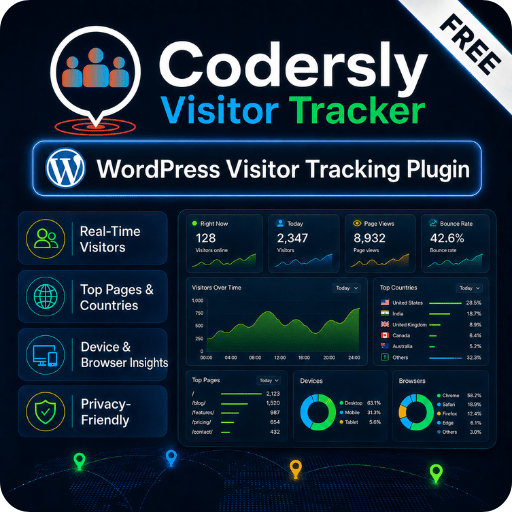
Codersly Visitor Tracker is a lightweight and privacy-aware Web Visitor Tracking Plugin for WordPress. It helps website owners track visitor activity, page views, referrers, landing pages, browsers, visit times, and human or bot visitor types directly from the WordPress admin dashboard.
This plugin is useful for blogs, business websites, WooCommerce stores, portfolio websites, agencies, and content-based WordPress sites that need simple visitor insights without using a complex analytics setup.
Free Web Visitor Tracking Plugin Available on WordPress.org
The free version of Codersly Visitor Tracker is available in the official WordPress Plugin Directory. You can install it from WordPress.org or directly from your WordPress admin dashboard.
It is a practical starting point for site owners who want basic visitor tracking, recent visitor activity, referrer recording, landing page tracking, browser details, visitor classification, and a searchable visitor list inside WordPress.
What is Codersly Visitor Tracker?
Codersly Visitor Tracker is a visitor analytics and traffic monitoring plugin for WordPress. It records useful visitor information such as current page, landing page, raw referrer, referrer host, referrer type, browser name, visit time, and visitor classification.
The plugin helps website administrators review recent visitor activity without opening a separate analytics platform every time. This makes it useful for quick traffic checks, basic visitor analysis, and lightweight website monitoring.
What is Web Visitor Tracking?
Web visitor tracking means recording and reviewing how visitors interact with a website. It may include page views, landing pages, current pages, referrers, browser information, visit time, and visitor type.
For WordPress site owners, visitor tracking can help answer important questions such as which pages visitors open, where traffic may come from, which browsers are used, and whether visits look like human traffic or automated bot activity.
Why Use a Web Visitor Tracking Plugin?
A Web Visitor Tracking Plugin helps website owners understand basic traffic behavior from one place. Instead of checking raw server logs or switching between multiple tools, you can review visitor records from a clean admin screen inside WordPress.
Codersly Visitor Tracker is built for users who want simple visitor insights, organized records, and practical website traffic information without unnecessary complexity.
Visitor Dashboard Inside WordPress
The plugin includes an admin dashboard where you can review visitor counters and traffic activity. This dashboard helps busy website owners, bloggers, store owners, and agencies check visitor data while managing their website.
Searchable Visitors Table
Codersly Visitor Tracker includes a searchable visitors table with filtering and pagination. This makes visitor records easier to review and manage.
From the visitors table, you can check visit time, current page, landing page, browser, referrer, visitor type, and other recorded request information.
Human and Bot Visitor Classification
Not every website visit comes from a real human visitor. Websites may also receive visits from bots, crawlers, scanners, uptime tools, and automated scripts.
Codersly Visitor Tracker records visitor classifications such as human, suspected bot, verified bot, and unknown visitor types. This helps site owners understand visitor activity more clearly.
Referrer and Landing Page Tracking
The plugin records referrer information when it is available from the visitor browser. It can store raw referrer data, referrer host, referrer type, landing page, and current page information.
This helps website owners understand whether visitors may be coming from direct visits, search engines, social platforms, referral links, or other sources when browser-provided referrer data is available.
Note: Referrer availability depends on browser behavior, privacy settings, and the referring website’s referrer policy. When referrer data is not available, the plugin does not guess incorrectly.
Privacy-Aware Visitor Tracking
Codersly Visitor Tracker is built with a privacy-aware approach. Visitor analytics data is stored locally in your WordPress database, and the plugin does not send visitor analytics data to Codersly.
Approximate location lookup is optional and disabled by default. If the site administrator enables location lookup, visitor IP information may be sent to the selected GeoIP provider for approximate location data.
Website owners should review their privacy policy and follow applicable privacy laws before enabling tracking or optional location lookup features.
Key Features
- Lightweight Web Visitor Tracking Plugin for WordPress
- Visitor dashboard with useful counters
- Searchable visitors table
- Filtering and pagination for visitor records
- Human, suspected bot, verified bot, and unknown visitor classification
- Current page and landing page recording
- Raw referrer and referrer host recording
- Referrer type information when available
- Browser name recording
- Visit time tracking
- First-touch referrer and landing page support
- Role exclusion settings for logged-in users
- Optional approximate GeoIP location lookup
- Local database storage
- Useful for blogs, business websites, WooCommerce stores, and content websites
Free Version vs Pro Version
| Feature / Option | Free Version | Pro Version |
|---|---|---|
| Basic web visitor tracking | Yes | Yes |
| WordPress admin dashboard | Yes | Yes, with premium workflow |
| Visitors table | Yes | Yes |
| Search and pagination | Yes | Yes |
| Human and bot classification | Yes | Yes |
| Referrer recording | Yes | Yes |
| Landing page recording | Yes | Yes |
| Browser information | Yes | Yes |
| Role exclusion settings | Yes | Yes |
| Optional approximate location lookup | Yes | Yes |
| Advanced analytics workflow | Limited | Included |
| Live visitor monitoring workflow | Basic | Premium workflow |
| Campaign reports | Not included or limited | Premium workflow |
| Export tools | Not included or limited | Premium workflow |
| License verification | Not required | Included |
| Best for | Free visitor tracking | Advanced visitor analytics |
Codersly Visitor Tracker Pro
Users who need more advanced visitor analytics, premium reports, export options, campaign-related insights, and a professional visitor tracking workflow can upgrade to Codersly Visitor Tracker Pro.
The Pro version is a separate premium add-on built for users who want to extend the free visitor tracking experience with advanced tools and license-based premium access.
Codersly Visitor Tracker Pro comes with a 1 year license. During the active license period, users can access premium features according to the license terms.
Who Should Use Codersly Visitor Tracker?
- Bloggers: Review recent visitor activity and understand which content gets attention.
- Business website owners: Monitor basic traffic activity from WordPress admin.
- WooCommerce store owners: Review visitor behavior and page activity from the dashboard.
- Agencies: Use a lightweight visitor tracking tool for client websites.
- Content publishers: Track page activity, referrers, browsers, and visitor records.
- Website administrators: Check visitor information without complex setup.
Why Choose Codersly Visitor Tracker?
- Simple and easy to use
- Works directly inside WordPress admin
- Lightweight visitor tracking workflow
- Dedicated visitor records table
- Useful visitor insights without unnecessary complexity
- Privacy-aware tracking approach
- Free version available in the official WordPress Plugin Directory
- Pro upgrade available for advanced visitor analytics
Frequently Asked Questions
Is Codersly Visitor Tracker a Web Visitor Tracking Plugin?
Yes. Codersly Visitor Tracker is a Web Visitor Tracking Plugin for WordPress that helps website owners monitor visitor activity, page views, referrers, landing pages, browsers, and basic traffic behavior from the WordPress dashboard.
Is Codersly Visitor Tracker free?
Yes. Codersly Visitor Tracker has a free version, and it is available in the official WordPress Plugin Directory.
Does the plugin store visitor data locally?
Yes. The plugin stores visitor records locally in the WordPress database using a dedicated custom table.
Does the plugin send analytics data to Codersly?
No. Codersly Visitor Tracker does not send visitor analytics data to Codersly.
Does it support bot classification?
Yes. The plugin records visitor types such as human, suspected bot, verified bot, and unknown visitors.
Does the Pro version replace the free plugin?
No. Codersly Visitor Tracker Pro is a separate premium add-on. The free plugin should be installed and active before using the Pro version.
Can I use this plugin for WooCommerce websites?
Yes. This plugin can be useful for WooCommerce store owners who want to monitor visitor activity, page views, referrers, and basic visitor behavior inside WordPress admin.
Is this plugin useful for basic SEO traffic review?
Yes. Codersly Visitor Tracker can help website owners review basic traffic activity, landing pages, referrers, visitor types, and page-level visitor behavior from WordPress admin. It does not replace a full SEO platform, but it can support simple traffic review.
Important Note
Codersly Visitor Tracker is the free/base plugin. Codersly Visitor Tracker Pro is a separate premium add-on for users who need advanced visitor analytics and premium tracking workflows.
You can install the free version from the official WordPress Plugin Directory and upgrade to Codersly Visitor Tracker Pro when you need premium features.
Summary
Codersly Visitor Tracker is a lightweight and privacy-aware Web Visitor Tracking Plugin for WordPress users who want visitor insights inside the WordPress admin dashboard. It helps record visitor activity, referrers, landing pages, browsers, visit times, and visitor classifications in an organized way.
The free version is a practical starting point for basic visitor tracking, while the Pro version is available for users who need advanced visitor analytics, premium tools, and a professional tracking workflow.


Henry Black –
Traffic analytics breakdown by device and browser is surprisingly detailed for a free tool.
Ivan Clarke –
GDPR-friendly tracking without cookies is very important for my European audience. Works great.
Gina Adams –
Bot detection feature actually works well. Cleaner analytics with real human visitors only.
Tina Lawson –
Device and browser tracking gives valuable insights. Free version is already very feature-rich.
Alice Morgan –
Amazing free visitor tracking plugin! Real-time visitor monitoring without any paid plan. Excellent.
Frank Miller –
The real-time visitor dashboard is impressive for a free plugin. Excellent data without any paid plan.
Olivia Brooks –
Nice plugin overall. It helps me view visitor information in a simple and organized way.
Liam Carter –
A practical plugin for monitoring website traffic inside WordPress. Setup was smooth and beginner friendly.
Sophia Bennett –
Clean dashboard and easy to understand. I liked how quickly I could start tracking visitor activity.
Ethan Walker –
Very useful visitor tracking plugin. It gave me a clearer idea of how people interact with my WordPress site.