Sale!

Codersly Courier Pro – Advanced Courier Management Plugin for WordPress 1 Year License

Original price was: $99.00.Current price is: $69.00.

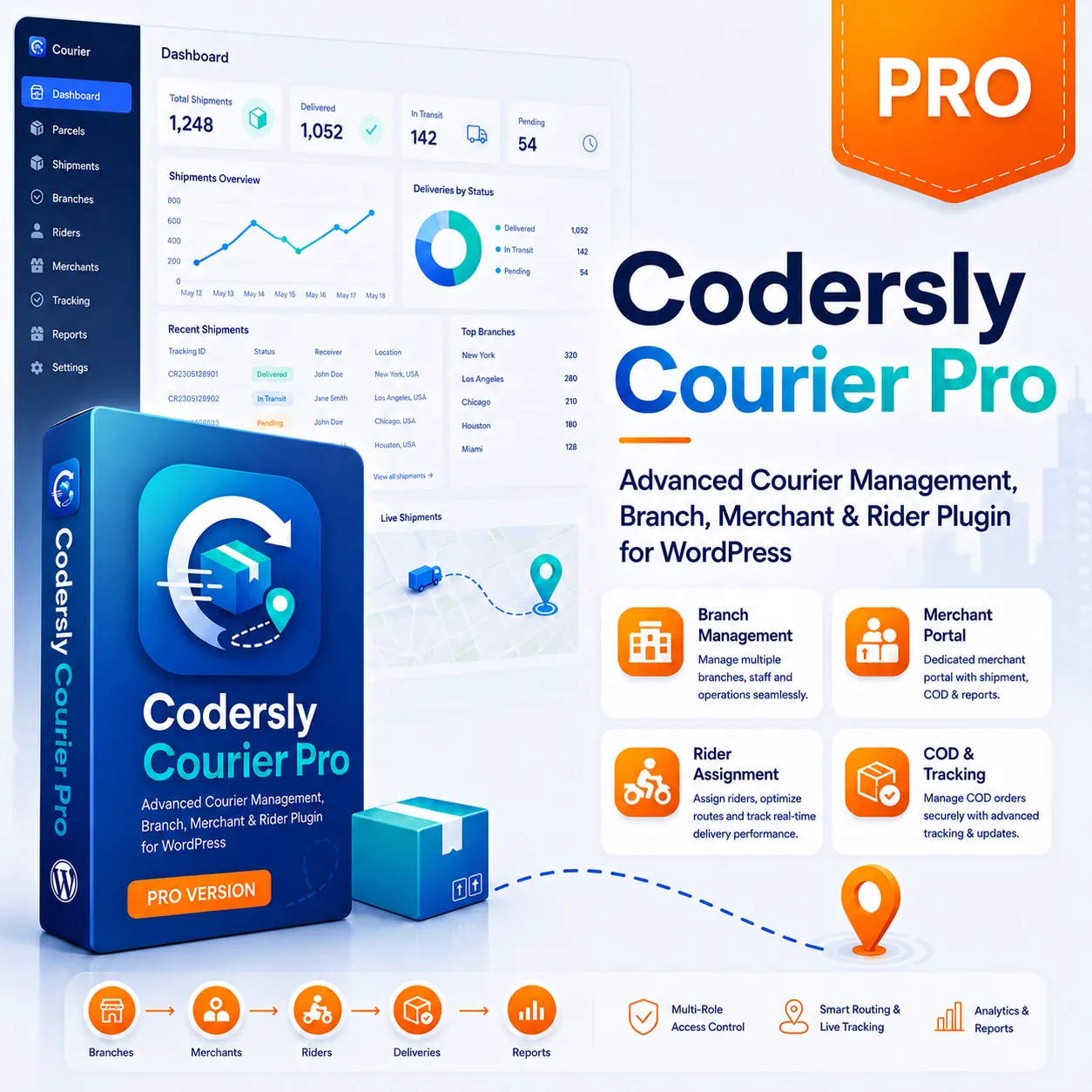
Codersly Courier Pro is a WordPress courier management plugin for managing branches, merchants, riders, parcel routing, Pick & Drop requests, COD, withdrawals, and tracking. Includes a one-year license with updates and support.

Buy Now

Description

Codersly Courier Pro is an advanced courier management plugin for WordPress, designed for businesses that want to launch, manage, and expand their own courier, parcel delivery, or local logistics service.

It extends the free Codersly Courier plugin with complete operational workflows for administrators, branches, merchants, customers, pickup agents, and delivery riders. From parcel booking and merchant Pick & Drop requests to branch routing, rider assignment, Cash on Delivery collection, merchant settlement, proof of delivery, failed-delivery handling, and returns, the entire courier operation can be managed directly from WordPress.

Codersly Courier Pro is not simply an integration with a third-party courier company. It provides the tools required to operate your own independent courier business using your WordPress website.

Requires the Free Codersly Courier Plugin

Codersly Courier Pro works as the premium operational extension of the free Codersly Courier plugin. The free or base plugin must be installed and activated before Codersly Courier Pro can be used.


Download Codersly Courier Free

Complete Courier Management System for WordPress

Codersly Courier Pro connects every important part of a courier operation through structured parcel workflows and dedicated role-based dashboards.

Administrators maintain full operational control, while branch managers, merchants, customers, pickup agents, and delivery riders receive access only to the information and actions relevant to their roles.

Codersly Courier Pro Features

  • Complete courier operations dashboard for administrators
  • Dedicated frontend dashboards for branches, merchants, customers, and riders
  • Multiple branch management
  • Origin and destination branch routing
  • Merchant parcel booking system
  • Merchant Pick & Drop request system
  • Custom pickup and delivery address management
  • Branch-controlled pickup rider assignment
  • Branch-controlled delivery rider assignment
  • Parcel pickup confirmation workflow
  • Origin branch receiving workflow
  • Inter-branch parcel transit management
  • Destination branch receiving workflow
  • Final delivery desk and rider assignment
  • Real-time parcel tracking timeline
  • Latest tracking update displayed at the top
  • Receiver name displayed across operational screens
  • Weight-based delivery charge calculation
  • Same-branch and cross-branch delivery pricing
  • Cash on Delivery management
  • Full, partial, and unpaid COD recording
  • Merchant balance management
  • Merchant withdrawal request system
  • Compact withdrawal history
  • Proof of Delivery information
  • Separate booked receiver and actual received-by records
  • Failed-delivery reason and attempt records
  • Return and re-delivery workflow support
  • Parcel search, filtering, and activity history
  • Operational reports and CSV export
  • Role-based permissions and courier capabilities
  • Responsive dashboards for desktop, tablet, and mobile

Administrator Dashboard

The administrator receives a complete overview of courier operations, including parcels, branches, merchants, customers, riders, pickup requests, parcel movement, delivery progress, COD records, merchant withdrawals, failed deliveries, returns, and operational reports.

Administrators can review parcel information, manage courier users, assign or correct branches, supervise parcel movement, monitor financial records, and control the entire courier network from one connected dashboard.

Administrator Capabilities

  • View total, pending, in-transit, delivered, and failed parcels
  • Manage branches, merchants, customers, and delivery agents
  • Review merchant and branch registration requests
  • Search parcels by tracking number, receiver, merchant, or status
  • Review parcel timelines and operational activity
  • Monitor COD amounts and merchant balances
  • Approve or reject withdrawal requests
  • Review failed deliveries and return requests
  • Export important courier records

Branch Dashboard

Each branch receives a dedicated frontend dashboard for managing its own courier operations. Branch managers can review incoming merchant requests, assign pickup riders, receive collected parcels, prepare outgoing parcels, receive incoming transit parcels, assign delivery riders, and complete the final delivery process.

Branch Workflow

Pickup Request → Pickup Rider Assigned → Parcel Collected → Origin Branch Received → In Transit → Destination Branch Received → Delivery Rider Assigned → Out for Delivery → Delivered

Branch Features

  • Branch overview and operational statistics
  • Pickup request management
  • Pickup rider assignment
  • Origin desk parcel receiving
  • Incoming transit management
  • Destination branch receiving
  • Delivery desk management
  • Delivery rider assignment
  • Failed-delivery review
  • Completed parcel records
  • Branch rider management

Merchant Dashboard

Merchants can manage their courier activities through a dedicated frontend dashboard without accessing the WordPress administration area.

The merchant dashboard contains separate options for regular parcel creation and Pick & Drop requests. Merchants enter parcel, pickup, and delivery information, while pickup and delivery riders are selected and assigned by the relevant branches.

Merchant Features

  • Add and manage parcels
  • Submit Pick & Drop requests
  • Enter custom pickup addresses
  • Enter complete receiver and delivery information
  • Enter parcel weight and COD amount
  • View the calculated delivery charge below the weight field
  • Track active and completed parcels
  • View the newest tracking update first
  • Monitor available merchant balance
  • Submit withdrawal requests
  • Review withdrawal date, amount, and status
  • Access the dashboard from desktop, tablet, and mobile devices

Merchant Pick & Drop Requests

The Pick & Drop system allows merchants to request parcel collection from one address and delivery to another address.

The merchant enters the pickup contact, pickup address, receiver information, delivery address, preferred pickup schedule, parcel weight, COD amount, and an optional order reference.

Merchants cannot select pickup or delivery riders. The origin branch assigns the pickup rider, and the destination branch assigns the final delivery rider.

Documentation and Support

Use the official documentation to learn how to install, configure, and operate Codersly Courier and Codersly Courier Pro.


Read the Codersly Courier Documentation

Customer Dashboard

Customers receive a dedicated portal for reviewing parcels they have sent or parcels they are expecting to receive.

Customers can view parcel information, receiver details, delivery progress, current status, and the complete tracking timeline without entering the WordPress administration area.

Customer Features

  • View sent parcels
  • View receiving parcels
  • Access parcel details
  • Review the current delivery status
  • View the newest tracking update first
  • Access public parcel tracking

Pickup and Delivery Rider Dashboard

Pickup and delivery agents receive mobile-friendly dashboards containing only their assigned tasks.

Pickup riders can review pickup contacts and addresses and confirm parcel collection. Delivery riders can review receiver information, delivery addresses, COD amounts, and assigned delivery tasks.

Rider Features

  • View assigned pickup tasks
  • View assigned delivery tasks
  • Review pickup contact and address
  • Review receiver name, mobile number, and delivery address
  • Confirm successful parcel pickup
  • Mark a parcel as out for delivery
  • Complete successful delivery
  • Record the actual received-by name
  • Record full, partial, or unpaid COD
  • Submit failed-delivery reasons and notes
  • Enter a preferred next delivery date

Weight-Based Delivery Charge

Codersly Courier Pro automatically calculates the delivery charge according to parcel weight and the rates configured by the courier administrator.

Separate rates can be used for same-branch and cross-branch deliveries. When a merchant enters the parcel weight, the estimated or final delivery charge appears immediately below the weight field.

Decimal parcel weights are calculated using the next full weight unit. For example, a parcel weighing 2.3 kg can be calculated using the configured 3 kg rate.

The delivery charge is recalculated on the server when the parcel is submitted, helping prevent manual price manipulation from the browser.

Advanced Parcel Tracking

The plugin provides a structured parcel tracking timeline for customers, merchants, administrators, branches, and operational users.

The latest tracking update always appears at the top. Users can immediately see the current parcel status without scrolling to the bottom of the timeline.

Tracking details can include the tracking number, receiver name, current status, branch movement, rider activity, booking information, and delivery history.

Receiver and Received-By Information

The original receiver name entered during parcel booking remains visible across important operational screens.

During successful delivery, the rider can separately record the name of the person who actually received the parcel. This prevents the original booked receiver information from being overwritten.

Cash on Delivery Management

Codersly Courier Pro supports Cash on Delivery operations, including expected COD amount, actual collected amount, full payment, partial payment, and unpaid delivery.

Actual collected COD can be connected with merchant balances, withdrawal requests, and settlement records.

COD Features

  • Expected COD amount
  • Actual collected COD amount
  • Full COD collection
  • Partial COD collection
  • Unpaid COD recording
  • Payment method recording
  • Merchant balance calculation
  • Merchant withdrawal requests
  • Withdrawal history and status

Proof of Delivery

Delivery agents can complete a parcel with important delivery information, including the actual received-by name, collected COD amount, payment status, and delivery time.

This creates a clearer operational history for administrators, branches, merchants, and customers.

Failed Delivery and Re-Delivery

When a parcel cannot be delivered, the delivery rider can record the failed-delivery reason, supporting notes, attempt time, and a preferred next delivery date.

Branch managers and administrators can review failed parcels and decide whether the parcel should be scheduled for another delivery attempt or moved into the return workflow.

Return Workflow

Codersly Courier Pro includes support for return-related parcel statuses and operational records.

Failed or refused parcels can be reviewed, routed back to the appropriate branch, and eventually returned to the merchant according to the courier company’s operational process.

Designed for Different Courier Businesses

  • Independent courier companies
  • Local parcel delivery businesses
  • City-based delivery services
  • eCommerce delivery operations
  • Document delivery companies
  • Multi-branch courier networks
  • Cash on Delivery businesses
  • Small and growing logistics companies
  • Entrepreneurs launching a courier startup

One-Year Codersly Courier Pro License

Your purchase includes a one-year license for Codersly Courier Pro, valid for one year from the original purchase date.

During the active license period, you will receive access to plugin activation, product updates, security improvements, WordPress compatibility updates, newly released Pro features, and customer support.

What Is Included with the One-Year License?

  • One year of Codersly Courier Pro license activation
  • One year of plugin updates
  • One year of security improvements
  • One year of WordPress compatibility updates
  • One year of newly released Pro features
  • One year of customer support

After the one-year license period expires, the version already installed on a previously activated website may continue to operate.

However, an active license will be required to receive future updates, download newer releases, access customer support, or activate the plugin on a new website.

License renewal is optional after the first year. Renewing the license keeps your courier system eligible for future improvements, security updates, compatibility updates, support, and newly released Pro features.

License term: One year, including plugin updates and customer support. Renewal is optional after the first year.

Frequently Asked Questions

Is Codersly Courier Pro a third-party courier integration?

No. Codersly Courier Pro is designed to help you operate and manage your own courier or delivery business using WordPress.

Does Codersly Courier Pro require the free plugin?

Yes. The free Codersly Courier plugin must be installed and activated before using Codersly Courier Pro.

Can merchants select pickup or delivery riders?

No. Merchants only submit parcel, pickup, and delivery information. Pickup and delivery riders are selected and assigned by the relevant courier branches.

Can merchants submit Pick & Drop requests?

Yes. Merchants can enter the pickup address and the final delivery address through the dedicated Pick & Drop section.

Does the plugin calculate delivery charges by weight?

Yes. The plugin calculates delivery charges according to parcel weight and the configured same-branch or cross-branch rates.

How long is the Codersly Courier Pro license valid?

The Codersly Courier Pro license is valid for one year from the original purchase date.

What is included with the one-year license?

The license includes plugin activation, product updates, security improvements, WordPress compatibility updates, newly released Pro features, and customer support for one year.

Will the plugin stop working after the license expires?

The installed version may continue to operate on the website where it was previously activated. However, an active license is required for future updates, support, new downloads, and activation on another website.

Is license renewal required?

Renewal is optional after the first year. An active license is required to continue receiving product updates, compatibility improvements, security updates, newly released Pro features, and customer support.

Build and manage your own courier business with WordPress using Codersly Courier Pro. Control branches, merchants, customers, riders, parcels, pickup and delivery, tracking, COD, withdrawals, and operational workflows from one connected platform.

Reviews

There are no reviews yet.

Be the first to review “Codersly Courier Pro – Advanced Courier Management Plugin for WordPress 1 Year License”

Your email address will not be published. Required fields are marked *

Subscribe to our Newsletter
Get updates about new products, tutorials, and promotions.