
Description
Connect WooCommerce Checkout to Lemon Squeezy
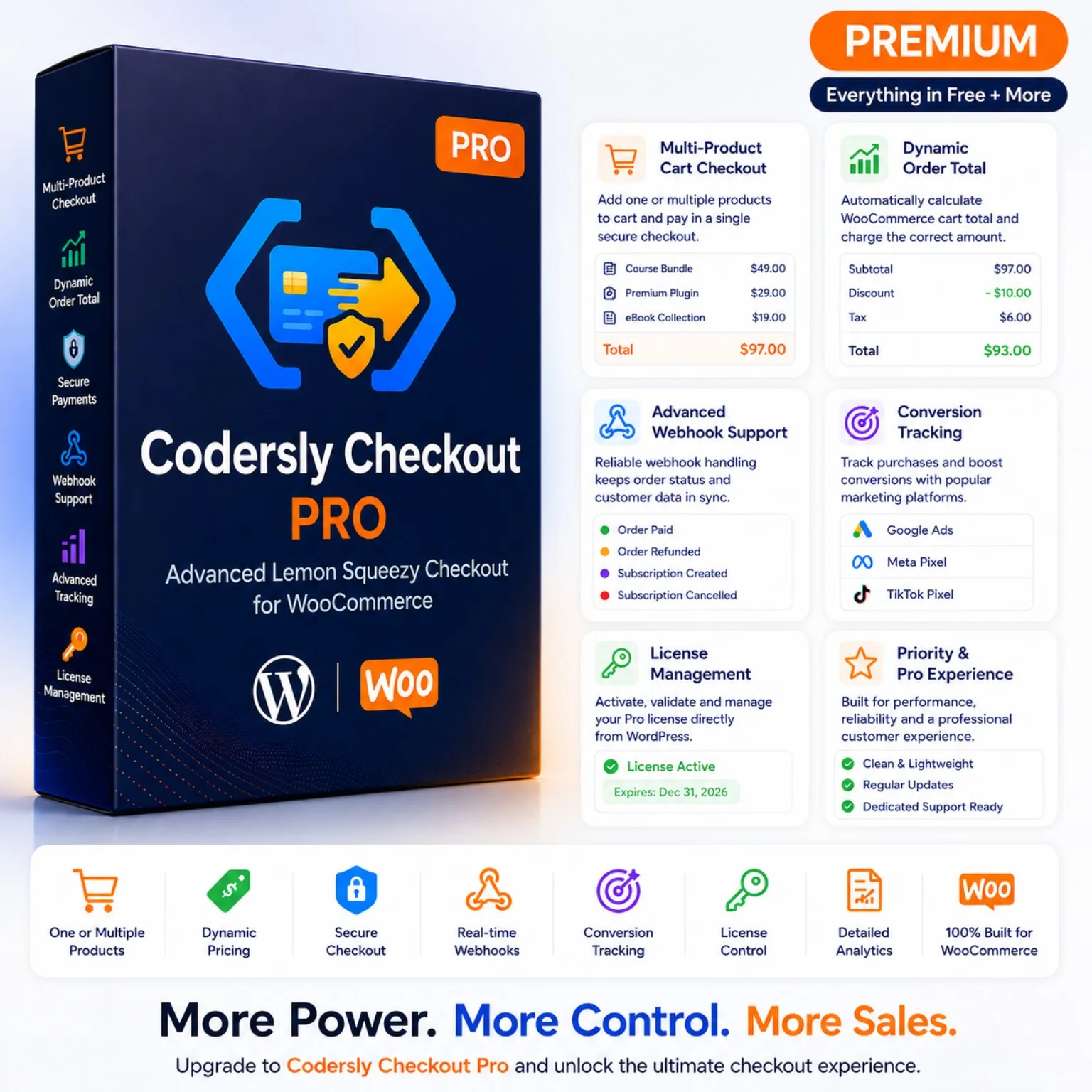
Codersly Checkout Pro is a complete WooCommerce payment-gateway integration powered by Lemon Squeezy.
Customers can add one or multiple digital products to their WooCommerce cart, complete the normal WooCommerce checkout form and continue to a secure Lemon Squeezy hosted checkout to make the payment.
After payment, a signed Lemon Squeezy webhook confirms the transaction and automatically updates the corresponding WooCommerce order.
One Payment for the Complete WooCommerce Order
Codersly Checkout Pro uses an order-total payment workflow.
Instead of forcing customers to make a separate payment for every WooCommerce product, the plugin calculates the complete WooCommerce order total and sends that amount to Lemon Squeezy as the checkout price.
This supports:
- Single-product WooCommerce orders.
- Multi-product WooCommerce carts.
- Different product quantities.
- WooCommerce coupons and calculated order totals.
- Product sizes, colours, attributes and selected variations.
- A familiar WooCommerce cart and checkout experience.
Dedicated Lemon Squeezy Payment Variant
The active order-total workflow uses one dedicated Lemon Squeezy variant as the payment item.
The plugin sends the actual WooCommerce order total as the custom checkout price while identifying the transaction using the WooCommerce order number and product summary.
This means administrators do not need to create or manually connect a separate Lemon Squeezy variant for every WooCommerce size, colour or variation.
WooCommerce Manages the Product Details
WooCommerce remains the source of truth for:
- Product names.
- Product quantities.
- Selected variations.
- Sizes and colours.
- Product attributes.
- Coupons and discounts.
- Customer information.
- Order records.
- Order totals.
Codersly Checkout Pro focuses on creating the Lemon Squeezy payment session and connecting the confirmed payment with the correct WooCommerce order.
Classic Checkout and Checkout Blocks
The plugin supports both major WooCommerce checkout experiences:
- Traditional or Classic WooCommerce Checkout.
- WooCommerce Cart and Checkout Blocks.
The payment method appears as Codersly Checkout and displays a clear Lemon Squeezy payment notice during checkout.
Streamlined Digital-Product Checkout
Codersly Checkout Pro is designed primarily for software, SaaS, plugins, themes, downloads, subscriptions, licenses and other digital products.
The current digital checkout layout focuses on the customer’s name and email address while removing unnecessary physical shipping and billing-address fields.
WooCommerce shipping-address requirements are disabled while the digital checkout mode is active.
Secure Hosted Checkout Creation
When a customer places an order, Codersly Checkout Pro:
- Retrieves the complete WooCommerce order total.
- Creates a custom Lemon Squeezy hosted checkout.
- Sends the customer’s name and email when available.
- Adds protected WooCommerce order identification data.
- Redirects the customer to the generated Lemon Squeezy checkout URL.
- Returns the customer to the WooCommerce order-received page.
- Waits for a signed webhook before marking the order as paid.
Signed Webhook Verification
The plugin provides a dedicated REST API webhook endpoint and verifies each incoming Lemon Squeezy request using an HMAC SHA-256 signature.
Before accepting an order event, it validates important transaction information, including:
- Webhook signature.
- WooCommerce order ID.
- WooCommerce order key.
- Expected Lemon Squeezy Store ID.
- Order currency.
- Test-mode status.
- Expected Lemon Squeezy variant.
- Duplicate webhook-event detection.
Invalid or mismatched webhook requests are rejected instead of updating the WooCommerce order.
Automatic WooCommerce Order Updates
When a valid order_created webhook reports a paid transaction, the plugin:
- Stores the Lemon Squeezy order ID.
- Stores the Lemon Squeezy transaction identifier.
- Marks the WooCommerce order as paid.
- Adds a payment-confirmation order note.
- Records the webhook result in the activity log.
Refund Processing
Codersly Checkout Pro processes supported Lemon Squeezy refund notifications.
- A confirmed full refund can update the WooCommerce order to Refunded.
- A partial refund notification adds an order note so the administrator can review the amount in Lemon Squeezy.
Subscription Synchronization
Supported subscription webhook events can be connected with the original WooCommerce order.
The plugin can store:
- Lemon Squeezy subscription ID.
- Current subscription status.
- Renewal date.
- End date.
- Subscription variant ID.
- Customer portal URL.
- Latest subscription invoice ID.
- Latest subscription-payment event.
- Billing reason.
Logged-in customers can receive a Manage Subscription button within their WooCommerce order details when a customer portal URL is available.
Lemon Squeezy License-Key Synchronization
For software and licensed digital products, supported Lemon Squeezy license-key webhook events can be stored with the corresponding WooCommerce order.
The plugin can display the following information to the logged-in purchaser:
- License key.
- License status.
- Activation limit.
- Number of used activations.
- License expiration date.
Purchase Conversion Tracking
Codersly Checkout Pro supports purchase conversion tracking for:
- Google Ads.
- Meta Pixel.
- TikTok Pixel.
Tracking is triggered only after the related WooCommerce order has been confirmed as paid.
Administrators must explicitly acknowledge that enabling these services may transmit visitor and purchase information to the selected advertising platform.
Website owners remain responsible for implementing the appropriate cookie-consent and privacy mechanisms required by their jurisdiction.
Payment and Webhook Activity Logs
The built-in logging interface helps administrators review checkout, API and webhook activity without leaving WordPress.
Logging features include:
- Enable or disable log recording.
- Error, warning, information and debug levels.
- Filter records by log level.
- Display 20 records per page.
- Previous and Next pagination.
- WooCommerce order links.
- Event names and detailed context.
- Clear all stored logs when required.
Product Mapping Management
Codersly Checkout Pro includes an administration interface for saving relationships between WooCommerce Product IDs and Lemon Squeezy Variant IDs.
Mappings can be:
- Added or updated.
- Searched by product ID.
- Deleted.
- Imported from CSV.
- Exported to CSV.
The current Pro 1.0.2 order-total checkout does not require a separate mapping for every product. It uses the dedicated payment variant configured under Advanced Features.
The mapping tools remain useful for data management, migration and compatible mapped workflows.
CSV Import and Export
Product mappings can be transferred using CSV files containing:
product_idlemon_variant_id
CSV import supports files up to 2 MB and processes up to 5,000 rows. CSV export includes up to 1,000 stored mapping records per export.
Pro License Management
Codersly Checkout Pro includes a dedicated WordPress license interface.
Administrators can:
- Enter a Codersly purchase code or license key.
- Verify and activate the license.
- Revalidate an existing activation.
- Deactivate the current website.
- Review the license status.
- Review the domain limit.
- Review the number of domains used.
- Review expiration information when applicable.
- Review the most recent license-server check.
- Review the latest license error.
The WooCommerce checkout runtime is enabled only when WooCommerce, Codersly Checkout Free and an active Codersly Checkout Pro license are available.
WooCommerce Compatibility
Codersly Checkout Pro declares compatibility with:
- WooCommerce High-Performance Order Storage, or HPOS.
- WooCommerce Cart and Checkout Blocks.
- Classic WooCommerce checkout.
- WooCommerce product and variation records.
COMPLETE FEATURE LIST
- Lemon Squeezy payment gateway for WooCommerce.
- Secure Lemon Squeezy hosted-checkout creation.
- Complete WooCommerce order-total payment.
- Single-product checkout.
- Multi-product cart checkout.
- Product-quantity support.
- WooCommerce-managed product variations.
- Dedicated Lemon Squeezy payment variant.
- Dynamic custom checkout price.
- Customer name and email transfer.
- Classic WooCommerce Checkout support.
- WooCommerce Checkout Blocks support.
- Digital-product checkout layout.
- Signed HMAC SHA-256 webhook verification.
- Order ID and order-key validation.
- Store ID validation.
- Currency validation.
- Test-mode validation.
- Variant validation.
- Duplicate webhook protection.
- Automatic WooCommerce payment confirmation.
- Full refund status processing.
- Partial refund order notes.
- Subscription-status synchronization.
- Subscription renewal and end-date synchronization.
- Customer subscription-portal link.
- Lemon Squeezy license-key synchronization.
- Customer-facing license-key information.
- Google Ads conversion tracking.
- Meta Pixel purchase tracking.
- TikTok Pixel purchase tracking.
- Tracking-consent acknowledgement.
- Checkout and webhook activity logs.
- Log-level filtering.
- Log pagination.
- Product mapping management.
- CSV mapping import.
- CSV mapping export.
- Pro purchase-code activation.
- Domain-based license management.
- HPOS compatibility.
- Professional WordPress administration interface.
REQUIREMENTS
- WordPress 6.0 or later.
- PHP 7.4 or later.
- WooCommerce installed and activated.
- Codersly Checkout Free 1.0.2 or later.
- A Lemon Squeezy account and verified store.
- A valid Lemon Squeezy API key.
- Lemon Squeezy Store ID.
- Lemon Squeezy webhook signing secret.
- A dedicated Lemon Squeezy payment variant.
- An active Codersly Checkout Pro license.
- SSL/HTTPS is strongly recommended for a production checkout website.
Important Currency Requirement
The WooCommerce order currency should correspond with the currency reported by the Lemon Squeezy checkout and webhook.
A webhook containing a different currency from the WooCommerce order will be rejected for security.
INSTALLATION AND CONFIGURATION
- Install and activate WooCommerce.
- Install and activate Codersly Checkout Free 1.0.2 or later.
- Open Codersly Checkout → API Connection.
- Enter the Lemon Squeezy API key.
- Enter the Lemon Squeezy Store ID.
- Enter the webhook signing secret.
- Select test mode when required.
- Save the connection details.
- Test the Lemon Squeezy API connection.
- Upload and activate Codersly Checkout Pro.
- Open Codersly Checkout → Pro License.
- Enter the Codersly purchase code or license key.
- Click Verify & Activate.
- Open Codersly Checkout → Advanced Features.
- Enter the dedicated Lemon Squeezy payment variant ID.
- Configure optional conversion-tracking settings.
- Open WooCommerce payment settings.
- Enable Codersly Checkout.
- Copy the webhook URL from the plugin dashboard.
- Add the webhook URL and signing secret to Lemon Squeezy.
- Complete a test-mode transaction.
- Confirm that the WooCommerce order updates after the signed webhook is received.
- Disable test mode before accepting live payments.
FREQUENTLY ASKED QUESTIONS
Does Codersly Checkout Pro require the Free plugin?
Yes. The Free plugin stores and tests the Lemon Squeezy API connection. The Pro plugin supplies the licensed WooCommerce payment and checkout runtime.
Can customers purchase multiple WooCommerce products together?
Yes. Customers can add one or multiple products to the cart and pay the complete WooCommerce order total through one Lemon Squeezy checkout.
Does every WooCommerce product require a Lemon Squeezy variant?
No. The current order-total workflow uses one dedicated Lemon Squeezy payment variant and sends the actual WooCommerce order total as its custom checkout price.
Are WooCommerce variations supported?
Yes. WooCommerce manages selected sizes, colours, attributes and variation information. The order-total workflow does not require a separate Lemon Squeezy mapping for every WooCommerce variation.
Does the plugin support physical products?
The current version is designed primarily for digital products and hides physical shipping and address fields while digital checkout mode is active. It is not recommended for a store that requires physical shipping information.
Does it support WooCommerce Checkout Blocks?
Yes. It includes a dedicated WooCommerce Blocks payment-method integration in addition to Classic Checkout support.
When is the WooCommerce order marked as paid?
The order is marked as paid only after a valid signed Lemon Squeezy webhook reports a paid transaction.
Does redirecting back to the thank-you page mark the order as paid?
No. Returning to the website alone is not treated as payment confirmation. A valid webhook is required.
How are full and partial refunds handled?
A confirmed full refund can change the WooCommerce order to Refunded. A partial refund creates an order note for administrator review.
Can it synchronize subscriptions?
Yes. Supported subscription and subscription-payment events can store status, renewal information, invoice information and the customer portal URL with the WooCommerce order.
Can customers see Lemon Squeezy license keys?
When supported license-key webhook data is associated with an order, the logged-in purchaser can view the license key and activation information in the WooCommerce order details.
Does it include conversion tracking?
Yes. Google Ads, Meta Pixel and TikTok Pixel purchase events can be enabled. Tracking fires only after the WooCommerce order is confirmed as paid.
Is visitor consent handled automatically?
No. Store owners must configure the appropriate cookie-consent and privacy solution before enabling third-party advertising scripts.
Does it keep activity logs?
Yes. Administrators can enable logging, filter records by level, browse paginated records and clear stored logs.
Is this an official Lemon Squeezy plugin?
No. Codersly Checkout Pro is an independent third-party integration developed by Codersly.
How many websites can use the license?
The current 1 year license on one website or domain.





Reviews
There are no reviews yet.